
New rule operators: wildcard, starts_with and ends_with
Eight string operators in the rules engine: what * covers, how strict wildcard differs from the default, how not_ checks behave without a field and which operator to pick.

Until now, string comparison in rules came down to exact match and substring search. Conditions like "every path under /api/", "any subdomain of example.com" or "a Content-Type ending in /json" had to be assembled from several rules or approximated with contains, which caught more than intended. Each of them is now a single operator.
What was added
Eight operators in four positive/negative pairs:
| Operator | What it checks | Case |
|---|---|---|
wildcard / not_wildcard |
whole string against a pattern with * |
insensitive |
strict_wildcard / not_strict_wildcard |
whole string against a pattern with * |
sensitive |
starts_with / not_starts_with |
string begins with the value | sensitive |
ends_with / not_ends_with |
string ends with the value | sensitive |
The operators apply to hostname, uri_path, uri, ua, ja4, method, scheme, and to any header or cookie via header.<name> and cookie.<name>. A condition is three keys — field, operator, value:
{
  "field": "uri_path",
  "op": "wildcard",
  "value": "/api/*"
}
How wildcard works
A pattern follows three rules, and all three matter in practice.
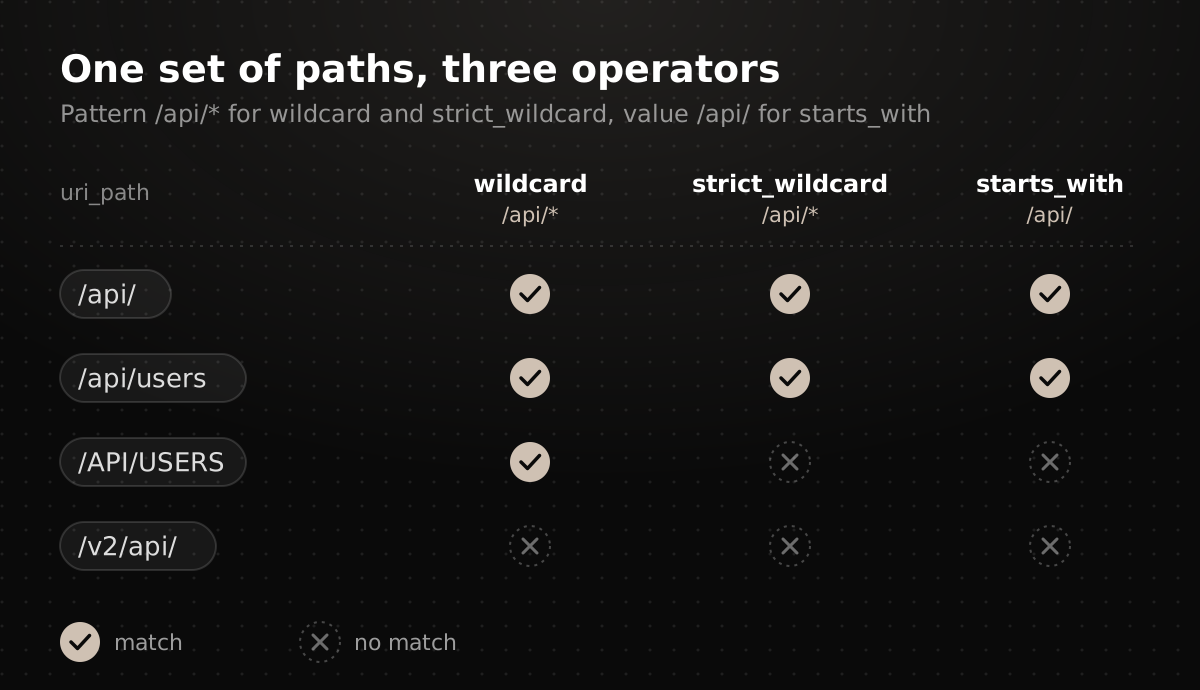
The whole string is compared. The pattern is not searched inside the value; it is applied to it in full. /api/* matches /api/users but not /v2/api/users: the string has to begin the way the pattern begins. For "somewhere inside", put * on both sides — */api/*.
* is zero or more of any characters, including /. A single * covers both an empty tail and nested paths of any depth: /api/* matches /api/, /api/users and /api/v2/users/42/orders. A pattern may contain several stars.
wildcard ignores case, strict_wildcard respects it. With /api/*, the default wildcard also lets /API/USERS through. If your backend is case-sensitive and /Admin/ is not the same as /admin/, use the strict variant.
A few typical patterns:
| Pattern | Matches | Does not match |
|---|---|---|
/api/* |
/api/, /api/v1/users |
/v2/api/, /apix |
*/admin/* |
/admin/, /en/admin/users |
/administrator |
*.php |
/index.php, /a/b/c.PHP |
/index.php5 |
*.example.com on hostname |
cdn.example.com, a.b.example.com |
example.com, example.com.evil.net |
* |
any string | — |
Several stars are handy for User-Agent strings, where versions sit between fixed parts:
{
  "field": "ua",
  "op": "wildcard",
  "value": "Mozilla/5.0 (Linux; Android *) AppleWebKit/*"
}
There is exactly one special character in a pattern — *. A ? has no special meaning and is compared as an ordinary character. To match a literal star, escape it with a backslash: \*; a literal backslash is written as \\. JSON escapes the backslash as well, so in a rule file it looks like this:
{
  "field": "uri_path",
  "op": "strict_wildcard",
  "value": "/files/\\*/*"
}
This pattern matches /files/*/report.pdf but not /files/2024/report.pdf.
Three kinds of pattern are rejected as invalid: an empty value, an unterminated escape (a backslash at the end of the string) and two unescaped stars in a row — **. A single * already covers any sequence, so ** is redundant and treated as an error.
starts_with and ends_with
These are special cases of wildcard that read unambiguously and do not require thinking about stars. Both are case-sensitive — like strict_wildcard, not like wildcard.
starts_with covers site sections and route groups:
{
  "field": "uri_path",
  "op": "starts_with",
  "value": "/admin/"
}
ends_with suits file extensions, domain suffixes and content types. The condition below covers application/json, application/problem+json and any other type with that ending, without listing them:
{
  "field": "header.Content-Type",
  "op": "ends_with",
  "value": "/json"
}
Both operators also work on the ja4 fingerprint: a shared prefix lets you select a group of similar clients with one condition instead of listing full values.
Negative checks and missing fields
Every operator has a not_ variant. The main subtlety is what happens when the field is absent from the request: a missing header or cookie makes the negative check true. The condition below matches both a request whose session does not start with prod_ and a request without that cookie at all:
{
  "field": "cookie.session",
  "op": "not_starts_with",
  "value": "prod_"
}
Usually that is what you want: "let through everyone without a production session". If the field must be present, combine exists and not_* in one all group — requests without the cookie will stop passing:
{
  "all": [
    { "field": "cookie.session", "op": "exists" },
    { "field": "cookie.session", "op": "not_starts_with", "value": "prod_" }
  ]
}
For fields present in every request — uri_path, hostname, method, scheme — this caveat does not apply; negation there is literal.
Which operator to pick
- A site section or route prefix —
starts_with. If case does not matter —wildcardwith a trailing*. - An extension, domain suffix or content-type suffix —
ends_with. - A fragment in the middle, or several variable parts —
wildcardwith multiple*. - Case matters —
strict_wildcard,starts_withorends_with; the defaultwildcardignores case. - A header or cookie must not look a certain way but must be present —
not_*together withexistsin anallgroup.
If you have been using contains for "path begins with…" conditions, it is worth moving them to starts_with: contains with /admin/ also fires on /blog/admin/guide, while starts_with does not.
What next
The new operators are already available; existing rules need no changes. Rules are configured in the workspace, and questions or configuration examples are welcome in our Telegram channel.